

Appearance
Color swatches
This guide describes the Theme settings > Color swatches menu options.
Use the settings to specify how color swatches are displayed throughout your store. Color swatches are color icons that represent product color variants. A color swatch is like a visual variant picker that allows customers to select a product color option.
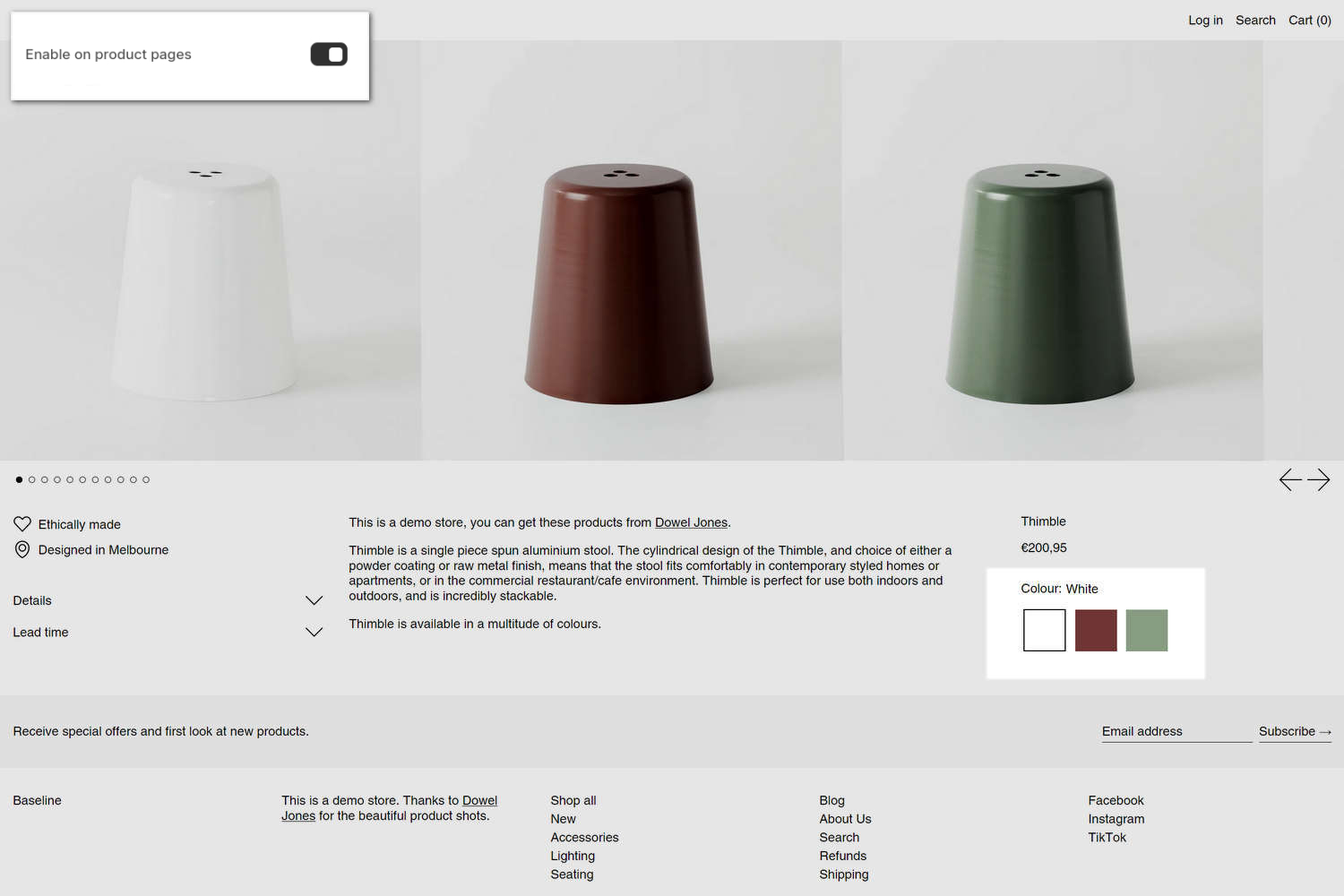
The previous image shows a store's Product page. In the upper left, part of Theme editor's Theme settings > Color swatches menu is displayed. The menu's Theme color swatches > Enable on product pages option is set to On. With this setting enabled, color icons or "swatches" are displayed on Product pages. In the previous image, the color swatch icons are displayed in the center right area. Each swatch represents a product color variant. Store visitors select a color swatch to choose a product color.
Note
Support for theme color swatches is provided for compatibility and may be removed in the future. We recommend using Shopify native swatches. Refer to Shopify help: Adding color swatches using category metafields.
For general guidance with adjusting a theme setting, refer to Settings overview and Shopify help: Theme settings.
Set up Color swatches
To set up Color swatches:
In Theme editor, go to Theme settings > Color swatches.
Select a setting described in the following table.
| Setting name | Description |
|---|---|
| Learn how to set up swatches (link) | Follow the Learn how to set up swatches link to the Shopify help: Adding color swatches using category metafields guide to learn how to use Shopify native swatches on your store. |
| Enable on product pages | Use the Enable on product pages option to show/hide Shopify native swatches on your store's Product pages. Refer to Shopify help: Adding color swatches using category metafields. |
| Enable in product tiles | Use the Enable in product tiles option to show/hide Shopify native swatches on product tiles. Color swatches are only supported in “Standard” product tiles. Refer to Shopify help: Adding color swatches using category metafields. |
| Enable in collection filters | Use the Enable in collection filters option to show/hide Shopify native swatches, inside the product filtering area, on your store's Collection pages. Refer to Shopify help: Adding color swatches using category metafields. |
| Theme color swatches > Enable on product pages | Use the Enable on product pages option to show/hide Theme color swatches on your store's Product pages. To use this option: In the Product pages section for a product with color variants, add a Variant picker block, and then, inside the Variant picker block's settings menu, set Options style to Button. Support for theme color swatches is provided for compatibility and may be removed in the future. We recommend using Shopify native swatches going forward. Refer to our Set up color swatches guide. |
| Theme color swatches > Enable in product tiles | Use the Enable in product tiles option to show/hide Theme color swatches on product tiles. To use this option: In a Collection section for a collection of products with color variants, inside the Collection section's settings menu, set the Product tile type option to Standard. Color swatches are only supported in “Standard” product tiles. Support for theme color swatches is provided for compatibility and may be removed in the future. We recommend using Shopify native swatches going forward. Refer to our Set up color swatches guide. |
| Theme color swatches > Enable in collection filters | UUse the Enable in collection filters option to show/hide Theme color swatches inside, inside the product filtering area, on your store's Collection pages. To use this setting, install the Shopify Search & Discovery app. Use the app to create a filter that adds a product option for Color. Set the Collection section to use a collection that contains products with color variants. Support for theme color swatches is provided for compatibility and may be removed in the future. We recommend using Shopify native swatches going forward. Refer to our Set up color swatches guide. |